Skip to content

Shopify app · SEO for product pages

Better product pages for Shopify SEO and AI search

Fexa AI finds what is missing or weak in your catalogue, then drafts search titles, meta descriptions, descriptions, ALT text and FAQs from your own product data. You approve every change.

  • Free scan
  • 10 AI drafts included
  • Nothing changes until you apply

Not ready to install? Check your store’s SEO for free →

Merino Wool Beanie

Score 48AI draft · not applied

Google preview

Now

Merino Wool Beanie

No meta description: Google picks a snippet.

Draft

Merino Wool Beanie with Rib Knit Cuff

Stay warm with this merino wool beanie, featuring a rib knit design and a fold-over cuff for comfort. Choose this one-size beanie for everyday wear.

  • Search title
  • Meta description
  • Description
  • FAQ · 3 questions
Only ticked fields are written. The original stays in History.
A real, unedited draft for a test product. Layout adapted from the Fexa AI review screen.

Shoppers find products through search engines and AI assistants:

  • Google
  • ChatGPT
  • Gemini
  • Perplexity
  • Claude
  • Copilot

The problem

Search engines and AI assistants can only use what your pages say

Shoppers now ask full questions, in Google and in AI assistants. To answer, these systems read your product pages. Most Shopify catalogues leave them very little to work with.

  • Search titles that are missing or cut off

    Without one, Google shows the bare product name. Too long, and it is cut mid-word.

  • Empty meta descriptions

    Google then writes its own snippet from whatever text it finds on the page.

  • Descriptions too thin to answer questions

    A dozen words say little about material, size, use or care, which is what shoppers ask.

  • Images without ALT text

    Search engines and screen readers get no description of what the photo shows.

Inside your Shopify admin, Fexa AI checks every product, collection and page for these gaps, for free.

Free tool

How does your store score? Check it in seconds

Enter your store address: the free checker reads your home page and five product pages and scores titles, meta descriptions, descriptions, image ALT text and structured data. No sign-up, nothing to install.

A real example

Same product, clearer page

One product, one credit. This is the unedited draft Fexa AI wrote for “Merino Wool Beanie”, a test product on our development store.

Before

SEO score 48/100
Search title
Not set
Google falls back to the product name: 18 characters
Meta description
Not set
Google picks a snippet from whatever text it finds
Description
Warm beanie in merino wool. Rib knit with a fold-over cuff. One size.
13 words
FAQ
None

Draft for your review

Not applied yet
Search title
Merino Wool Beanie with Rib Knit Cuff
37 of 60 characters
Meta description
Stay warm with this merino wool beanie, featuring a rib knit design and a fold-over cuff for comfort. Choose this one-size beanie for everyday wear.
148 of 155 characters
Description
A warm beanie made from merino wool, designed for comfort. The beanie includes a fold-over cuff, adding to its design and fit.This merino wool beanie is a straightforward option for keeping warm.
FAQ
  • What material is this beanie made from?
  • What is the design of the beanie?
  • What size is this beanie?
Each question comes with an answer drawn from the product data.

What it did not write

No “itch-free”, no “machine washable”, no free-shipping promise. The product data says merino wool, rib knit, fold-over cuff and one size, and the draft sticks to that.

What you do next

Edit any line, untick the description if you prefer your own, then apply. Richer product data gives richer drafts: add material details or care notes in Shopify and generate again.

Demo

Watch the whole workflow in 6 minutes

Scan, generate, edit, apply, check the result in Shopify, restore, batch, billing and the FAQ block, recorded on a development store with captions.

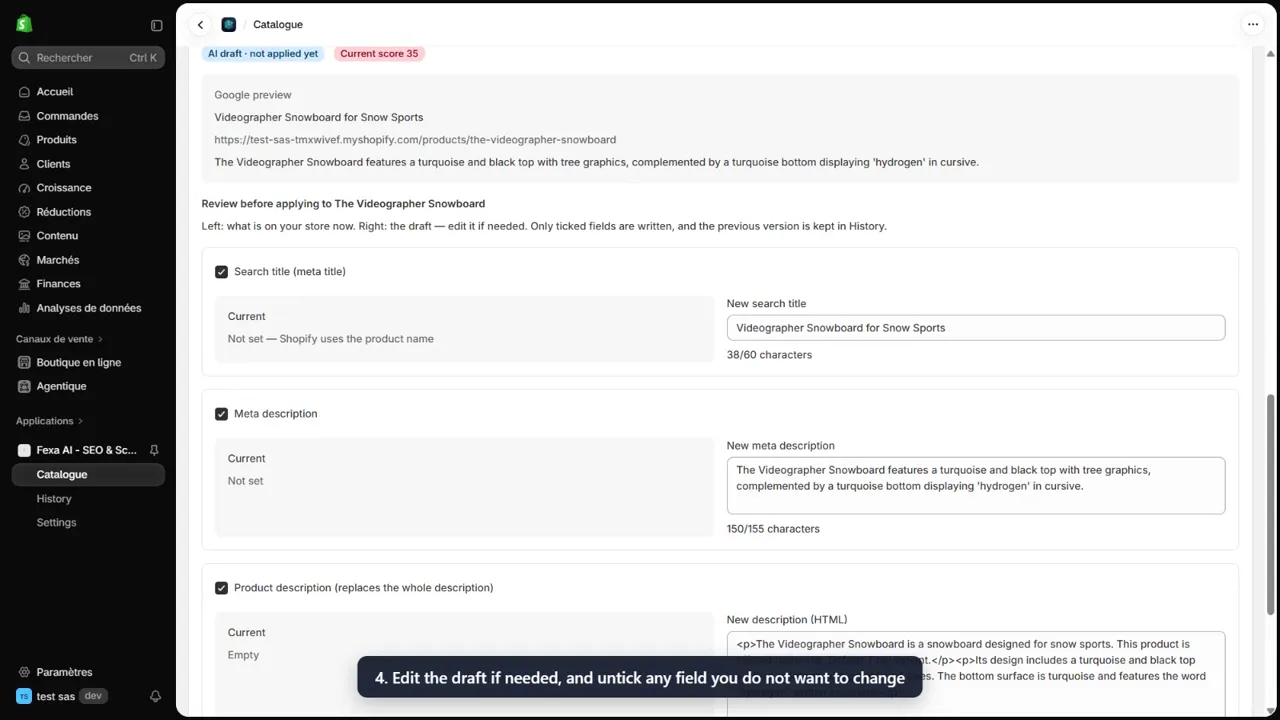
Fexa AI review screen from the demo video: a draft search title and meta description next to the current content.▶ Watch the demo on YouTube (opens in a new tab)

How it works

From install to better pages, inside your Shopify admin

Nothing runs on its own in your store. Fexa AI finds the work and drafts it; you decide what goes live.

  1. Step 1

    Install from the Shopify App Store

    Fexa AI opens inside your Shopify admin. No separate account, no theme code to edit.

  2. Step 2

    Scan your catalogue

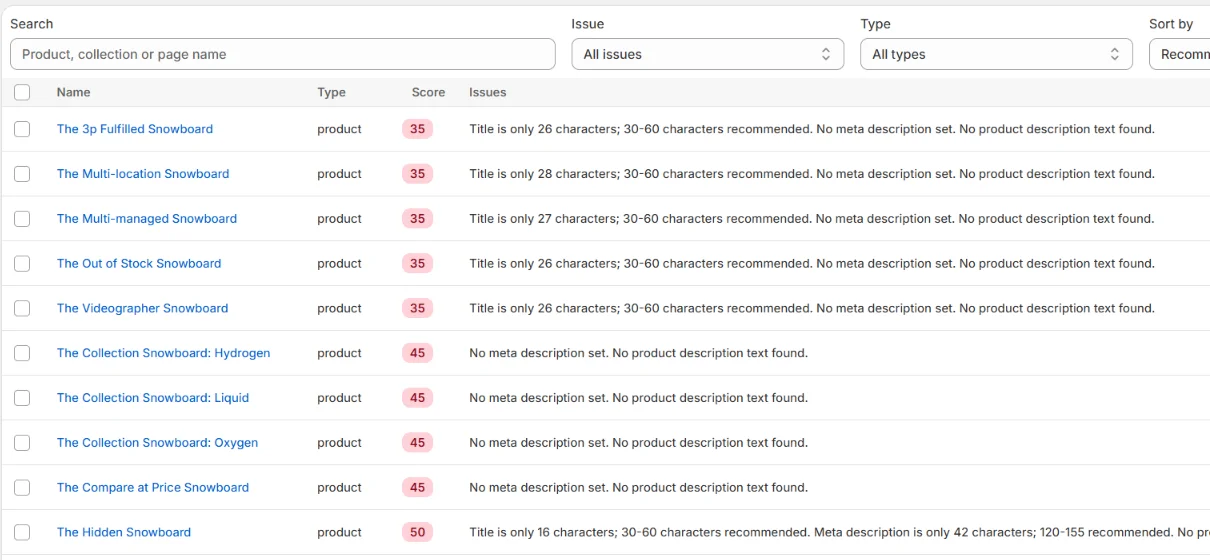
    Products, collections and pages get an SEO score and a plain list of issues, sorted by priority. Scanning is free.

  3. Step 3

    Generate drafts

    One credit drafts the search title, meta description, description, image ALT text and FAQ for an item, from its own data.

  4. Step 4

    Review, edit, apply

    Current content sits next to the draft. Edit any field, untick what you want to keep, then apply.

  5. Step 5

    Restore anytime

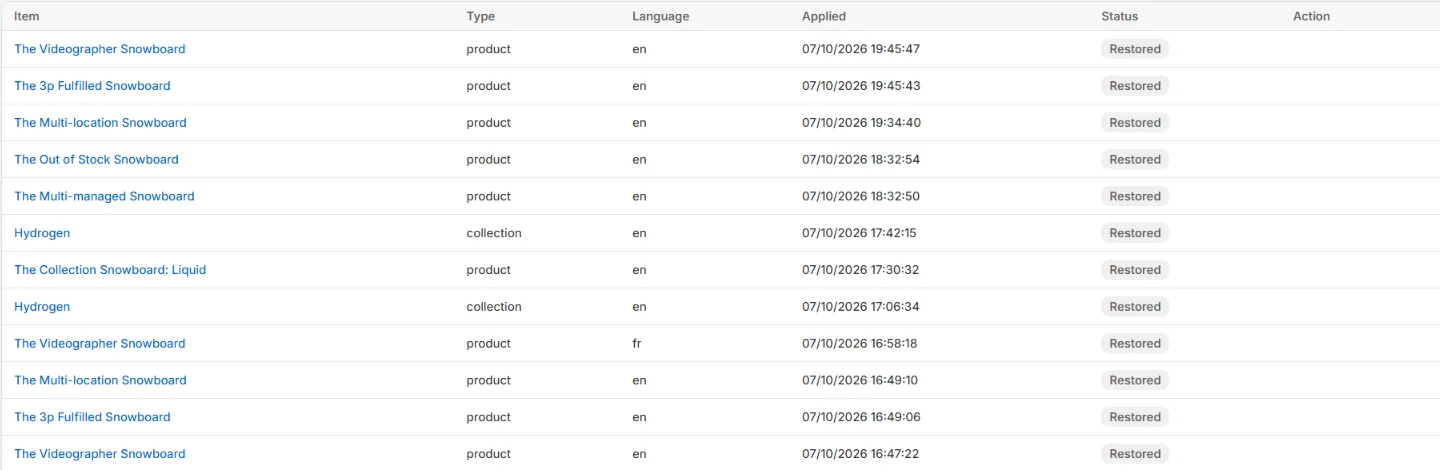
    Every applied change keeps the previous version in History, restorable item by item or by batch.

Fexa AI catalogue in the Shopify admin: products listed with an SEO score and issues such as a title of only 26 characters, no meta description set, and no product description text.
Scan: every product, collection and page gets a score and its issues in plain words.
Fexa AI History: applied changes with their date and status, and a Restore original button.
History: every applied change, ready to restore.

What it improves

The content that decides how your products show up

  • Search titles

    Checked against the title Google actually shows, store name included. Drafts aim for 30 to 60 characters and never exceed 60.

  • Meta descriptions

    Drafted for 120 to 155 characters, so the snippet says what you sell instead of being cut or guessed.

    Learn more about meta descriptions →
  • Product descriptions

    Short paragraphs built from your data, with internal links to the product’s collection and closely related products. Tables and videos are kept.

    Learn more about product descriptions →
  • Image ALT text

    Missing or weak ALT text is rewritten from the product name and details, one line per image.

    Learn more about image alt text →
  • Product FAQs

    Questions shoppers ask, answered from your data. An optional theme block shows them with matching FAQ structured data.

  • Collections and pages

    The same checks and drafts for collection and page titles, meta descriptions and text.

  • Your other languages

    Search titles and meta descriptions for each language published in your store.

SEO and AI search

One foundation for Google and AI assistants

Google ranks pages it understands. AI assistants answer from pages they can read and quote. Both need the same thing: specific, well-structured product content.

  1. Your Shopify product dataTitles, options, tags, metafields, existing text
  2. Fexa AI drafts and checksSEO lengths, structure, unsupported claims removed
  3. You review and applyYour product pages are updated in Shopify

Your pages are then read, on their own terms, by:

  • Google
  • ChatGPT
  • Gemini
  • Perplexity
  • Claude
  • Copilot

Specific facts

What the product is, what it is made of, its size and its use, taken from your data, not generic praise.

Clear structure

A search title, a meta description, short paragraphs and image ALT text, each where search engines expect it.

Answers to real questions

A product FAQ, shown by an optional theme block that also adds FAQ structured data to the page.

An llms.txt file for your store

A plain-text list of your published products and pages, served at /apps/catalog-seo-ai/llms.txt. It is a proposal, not a standard: each assistant decides whether to read it.

How it works for llms.txt →

What we don’t promise. No app controls rankings or what an AI assistant shows. Fexa AI improves the content these systems read. It is not affiliated with Google, OpenAI, Anthropic, Microsoft or Perplexity.

Why not just use a chatbot?

An SEO workflow, not a text box

Writing a paragraph is the easy part. Knowing what to fix, keeping it accurate and putting it safely on a live store is the work Fexa AI does.

  • It starts with an audit

    You see what is wrong on each item before spending a credit, and where to start.

  • It sticks to your data

    Claims your data does not back up, such as free shipping, guarantees, eco or health claims, performance figures or best-seller talk, are removed from the draft and listed for you.

  • SEO rules are built in

    Lengths, the title as Google renders it, duplicate store names and paragraph structure are handled for you, not left to a prompt.

  • Nothing goes live without you

    Only the fields you tick are written to Shopify. Store offers you declare, like free returns, are inserted word for word.

Pricing

Start free. Pay only for drafts.

Scans, reviews, applying and restoring never use credits. One credit is one AI draft. Billing goes through Shopify.

Free

$0

10 AI drafts at install, full catalogue scan.

Growth

$19 / month

200 AI drafts every billing period. Cancel anytime.

Credit pack

$9.99

100 AI drafts, one-time. No subscription.

Details in pricing.

Questions merchants ask

Is Fexa AI made for Shopify?

Yes. It is a Shopify app: you install it from the Shopify App Store and use it inside your Shopify admin. It reads and writes your products, collections and pages through Shopify, and billing goes through your Shopify invoice.

Will it change my products automatically?

No. Scanning is read-only and drafts are not published. A change is written to your store only when you apply it, and only for the fields you tick. The previous version is kept in History so you can restore it.

What happens right after I install it?

You land on the app home in your Shopify admin with 10 free credits. Run the free quick scan, then open Catalogue to scan everything and generate your first drafts.

Is this just ChatGPT with an interface?

No. Fexa AI audits your catalogue first, drafts from each item’s own data, removes claims that data does not support, enforces SEO lengths and lets you review every field before anything is written. A chat assistant does none of that on your live store.

Does it work for a large catalogue?

Scans cover every product, collection and page. You can sort by priority, select the items that fit your credits and generate, apply or restore them in batches.

Can it guarantee better rankings or mentions in ChatGPT?

No tool can, and we do not claim to. Fexa AI improves the content search engines and AI assistants read: clearer titles, complete descriptions, real answers. Rankings and AI answers depend on many factors outside any app.

What does it cost?

The Free plan includes 10 AI drafts. After that, Growth is $19 per month for 200 drafts, or buy 100 drafts once for $9.99. Scans, reviews, applying and restoring are always free.

See what your catalogue is missing

Install Fexa AI, run the free scan and review your first 10 drafts. Nothing changes in your store until you apply it.

Already installed? Log in to the web dashboard